Sunday, May 8, 2011

Feb - May Contest Wins & Thanks!

I've just been absolutely horrible about updating this blog. Let's give this another try!


Here's a quick shot of what I received from February to May from various contests hosted by bloggers and publishers (again, the fancy border is courtesy of Picnik). Actually, there were a few more not pictured here because my place is like a mini-library for my friends and whenever they see something they might want to read, they borrow it from me. They're really good about returning them in good condition, so I don't mind if I'm not the first to read them. Reading may be a solitary activity, but good stories are always meant to be shared :D

The Flirt Club by Cathleen Daly from I Am a Reader, Not a Writer

The Night Season by Chelsea Cain from Lori's Reading Corner


Sins of a Highland Devil by Sue-Ellen from In the Hammock

Deadly Heat & Deadly Lies by Cynthia Eden from Thoughts in Progress

How to Marry a Duke by Vicky Dreiling from Michelle & Leslie's Book Picks

Ohh, Baby! by Ann Roth from Fresh Fiction

How Sweet It Is by Sophi Gunn from So Many Precious Books, So Little Time!

To Tempt a Rake by Cara Elliott from So Many Precious Books, So Little Time!

One Fine Cowboy by Joanne Kennedy from Thoughts in Progress

The Journey Home by Michael Baron from My Books Views

The Legal Limit by Martin Clark from the Regal Literary Crime Spree Contest

Hell's Corner audiobook by David Baldacci from Martha's Bookshelf

The Attractional Church by Billy Hornsby from Along the Way

Blood Red Road by Moira Young. Eek! I'm not sure where I received this, but I wish I had it here and took its cover picture because it has a very moody look to it.

Hotel in the Corner of Bitter and Sweet by Jamie Ford. Not sure about this one either, I promise to keep better track next time!

Sixty Nine by PYNK from Thoughts in Progress

Thank you all!

Friday, February 4, 2011

The Lazy Person's Copy & Paste

Dear Auto Copy,

Where have you been all my life?

When I was young and didn't know better, I had to:

HIGHLIGHT TEXT-> EDIT -> COPY -> EDIT -> PASTE.

Since I've gotten a little older, I've learn the virtues of:

HIGHLIGHT TEXT -> CTRL+C -> CTRL+V.

Now that you've come into my life, all I know is:

HIGHLIGHT TEXT -> CTRL+V

You've spoiled me from all other browsers and applications that can't seem to understand when I highlight a piece of text, 99% of the time, it means I want to copy and paste it somewhere else.

Thanks a lot, Auto Copy.

Wednesday, February 2, 2011

January Thanks!


I've been super duper lazy about thanking the awesome folks who have held contests in which I've actually...you know...won something. O_O  I sooooo love the texture of a new book in my hands. So far I've only flipped through these, as real life scholastic endeavors keep calling. But here's a quick shot of what I received January on my still relatively new Ikea table. I added the flower borders (criminally easy to do, btw, see Picnik post) as a way of expressing my sympathies for the people in the path of the impending snowpocalypse.

Alice I Have Been by Melanie Benjamin from the Random House Reader's Circle.

Kat, Incorrigible (ARC) by Stephanie Burgis from Simon & Schuster.

The Darling Strumpet by Gillian Bagwell from Lori's Reading Corner.

Rescue (ARC) by Anita Streve from Under My Apple Tree.

Style by Lauren Conrad & a $200 Gift Certificate (not pictured because I gave it to my mom as a present :)) from Harper Teen (their contest page has no feeds, I use AlertBox to notify me of new contests!)

Do you guys notice a pattern in the book covers? It's all female and from different genres. I think it's an awesome sign for 2011. Women telling stories about women because we're awesome. *shakes fists* :D

Sunday, January 16, 2011

Less Clicking, More Time Saved!

...the continuing chronicles of a FireFox fangirl.

All right, I'm very well aware that I am becoming a FireFox fangirl with this blog. But I can't help it, Firefox is awesome with its multitude of helpful and time saving extensions. So once again, I have to sing my praises for a particular extension that's helped to save me from having a worn out click-finger. I would like to present to you....


Gimme, gimme, show me the whole row!
I like to shop and I do a lot of my shopping online, especially the bargins and sales. Everything suddenly looks so much more interesting when it's on sale, right?  But the manic clicking involved takes the fun out of it. Going back and forth, clicking here, clicking there.  Even with the tabs that FireFox offers, there's still lots of clicking going on. Look, this whole row of shirts look interesting, can't I open ALL of them at once instead of clicking on the first one, then clicking back, then clicking on the second one, ad nauseum?

When you have Multi Links installed, it has the feel of real life shopping.


Highlight the whole row with my mouse (in green) and it detects the links (in red).

The individual pages open up for me as tabs, waiting for me to flip through each item. You're browsing through the tabs just like you're browsing through the racks.


All the pages are loaded...less clicking, less waiting for each page to load, get more reading done! :D


Sometimes I see a page that lists all the contests that I want to enter:

 
One swipe of my mouse and three tabs (one for each contest page) will open up instantaneously. 

Now I just have to cross my fingers and wish for luck!


What I like about this is I spend less time clicking here and clicking there. I click and highlight all the links I want opened, and they open simultaneously. With my DSL line, that means when I'm done looking at one tab, the other tabs are already there, waiting for me to read. If you ask me, this shouldn't be just a Firefox extension, the function should be built in. Download it here!


Happy browsing! :D

Monday, January 10, 2011

Huge Posters Without the Huge Price

I always see these huge framed prints when I go to Ikea. But the prices sort of corresponds to the size, and I don't necessarily like the huge prints themselves, but just the fact that they're huge is...special.

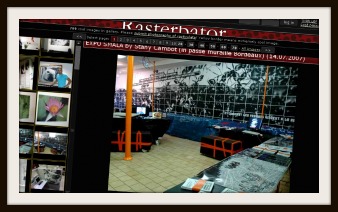
So I came across this site called Rasterbater. It takes any picture that's on your computer (and if it was in your computer in the first place, THAT''s probably something you'd want as a huge print) and makes it as big as 20 meters in size. It enlarges the picture and cuts it in a way that you can print it out with your home printer. Think tiles, each piece making up the bigger picture.

Rasterbator (not to be confused with the other 'bator')

Confession time. I haven't used it myself (although you can check out their gallery to see how other people have done it) because my printer is always running out of ink, black or color, or both, or some weird combination of both so anything I print in color turns out to be puke green.

A picture in the Rasterbator gallery, the result covers the entire wall!

The next time my printer is full stocked, I'm going to try it with a NASA image, with the colors inverted, just for kicks. :D

That's Earth and the Moon!

Friday, January 7, 2011

Go Google Yourself--Automatically

Admit it, you google yourself.  Don't sweat it, google's a verb now. Who hasn't, by now, googled themselves to see what turns up?

But how often do you 'google' yourself? Once a day? A week? Once in a blue moon? How would you know if someone has cut you off on the internet superhighway in the last few days?  'HOW DARE YOU?! OMGWTFBBQ!' just doesn't have the same effect if the message was posted many many months ago and you're just finding it now.

So what are you going to do?  Google yourself everyday?  What if you sprain something?  Like your patience?

The solution:

Google Alerts does your googling for you and send you new results as often as you like.

So let's say I'm an author, "Jane Doe" and I recently wrote a book called "Anonymous Girls R Us" and I want to know what people are saying about it, but I don't want to google "Jane Doe" and "Anonymous Girls R Us" every day. It's tedious. I want it to be an assembly line, give me the results as people are posting them online.

Google Alerts does that for you.  I put "Jane Doe" and "Anonymous Girls R Us" as the search terms (they are in quotes because I want exactly Jane Doe. Otherwise the results might have something like: A doe found Jane in the forest).


I want to see what the blogosphere is saying, so I choose 'blogs' as the type of results I want. Then I can specify, when do I want these results?  Once a day? A week? And how do I want to get those results? In my email? Or created into my own special RSS feed? Click 'Create Alert' and you're done!

Here's a Youtube video for the visually inclined.  This video is not mine, but it shows you how easy it is:


If you want the nitty gritty stuff, or if you have a common name, check out Google's get started guide to help to filter out the bad results.

It doesn't even have to be your name, it can be your brother's name, your company's name, your boss's name (if you really want to go there), your favorite no-name celebrity's name, etc. Go nuts! You can create up to 1000 alerts.

Googling yourself is so old school. 
Use Google Alert and you'll never go back.

Wednesday, January 5, 2011

Photoshop!Fail vs. Picnik!Sucess

I have Photoshop!Fail. On the best of days, it makes my eyes cross. I have to sort of settle down and let it flow over me, breathe. My relationship with Photoshop, well, it's complicated. Sort of dread and hope all mixed together. Complex.

But what's the internet without nicely cropped pictures with texts and glittery stuff? Text. Like early 90's WordPerfect text. The F# keys...those were the days. Technically, do we still need the F# keys? I mean, the last I heard Google was getting rid of the CAPS LOCK, what do we need the F# keys for?

Wait, I'm getting off track here.

Pictures!

So I find this picture (and many more free pictures here)...

...and Picnik takes my picture out for a 2 minute party, 
and we end up making beautiful & cheesy music together.

Picnik is what Photoshop is if I can get to him it anytime I'm online. He It doesn't take forever to start up and paying attention to me. He It doesn't get cranky if I use other computer programs or browse the Internet, in fact, it encourages you to post that finished picture right on to your blog, twitter, what-have-you. He It doesn't require a commitment either, you can go to www.picnik.com, upload a picture from your computer or your flickr, Picasa, Facebook, whatev., and start the party without signing up--just save to your computer or post to your social network when you're done.

He It just knows me and knows what I want to do with my pictures: flaunt them, yeah! And the main benefit is, of course, that Picnik is a cake walk compared to Photoshop when you want to crop, resize, add effects, text, shapes, etc. It's made me question my relationship with Photoshop. Especially since the best browser ever with the best extension ever, Firefox, has an extension for Picnik, so you don't even have to go to the website, just right-click on a picture you want to edit, it will open Picnik for you along with the picture you want to edit. 

This is the polar opposite of Photoshop!Fail.  
This is Picnik!Success.


Right-click on a picture and you get Picnik functions for that picture.

Photoshop, it's still complicated. 
But I've got Picnik on my right-click.